

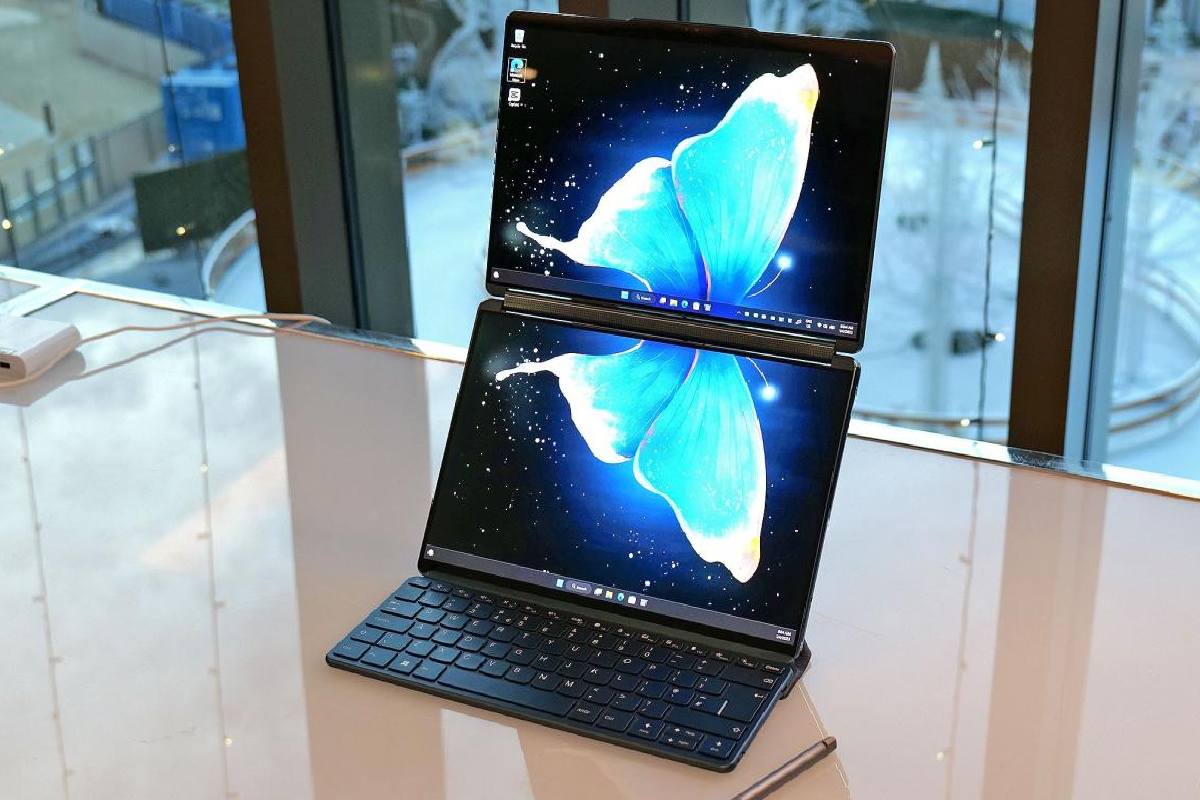
Forget searching for a static price. The real question is: does the Lenovo Yoga Book 9i’s revolutionary dual-screen design justify its premium cost for your work? This in-depth review, analyzing its performance for Indian students, creators, and professionals, will help you decide if this futuristic laptop is a productivity breakthrough or an overpriced gadget.
Quick Verdict: The Yoga Book 9i is a magnificent niche device, not a universal laptop. It’s worth it if you are a multitasking professional, digital content creator, or tech enthusiast who can leverage its dual screens for workflow revolution. It’s not worth it if you need raw power for video editing, are on a strict budget, or prefer a traditional, straightforward laptop experience.
Part 1: Hands-On Experience & Core Philosophy
Having used the device for productivity and creative tasks, the first week is spent unlearning single-screen habits. The “aha” moment comes when you flow a research PDF on one screen while writing on the other, or keep a video call open below your main workspace.
The Fundamental Mindset Shift: You are not buying a laptop with a great keyboard. You are buying a portable dual-screen workstation that happens to fold into a laptop. The included Bluetooth keyboard and folio stand are not accessories; they are essential components of the system.
Part 2: Detailed Pros & Cons for the Indian Context
| The Advantages (What Shines) | The Drawbacks & Considerations |
|---|---|
| ✅ Unmatched Multitasking: Effortlessly run two full-screen apps. Perfect for coding (IDE + browser), writing (doc + research), trading (charts + news). | ❌ High Price Point: At nearly ₹2,50,000, it competes with high-end MacBook Pros and gaming laptops. |
| ✅ Brilliant Portable Setup: The folio stand creates a stunning, ergonomic dual-monitor setup anywhere—a café, airport lounge, or client office. | ❌ Not for Power-Intensive Tasks: The Intel Core i7 U-series processor is efficient but not for heavy 4K video editing or AAA gaming. |
| ✅ Exceptional Build & Screens: The all-metal chassis feels premium. Twin 13.3″ 2.8K OLED displays are vibrant, sharp, and great for color-sensitive work. | ❌ Learning Curve & Software Quirks: Lenovo’s UI tools need polish. Some Windows apps don’t handle dual screens gracefully. |
| ✅ Surprising Daily Driver Potential: With mindful use, the 10-hour rated battery can last a full workday (approx. 6-8 hours real-world with both screens on). | ❌ Keyboard & Trackpad Trade-off: The detached keyboard, while good, lacks the solid feel of a traditional laptop. The trackpad is small. |
The Critical “Ecosystem” Check:
Your workflow must be cloud-based (Google Drive, OneDrive, etc.) or use the 512GB/1TB SSD wisely. There’s no room for a vast local media library.
Part 3: Who Should (and Shouldn’t) Buy This Laptop?
✅ BUY IT IF YOU ARE A…
-
Multitasking Professional: Financial analyst, researcher, programmer, or writer who constantly references multiple documents.
-
Digital Content Creator: YouTuber, blogger, or social media manager editing photos/videos while monitoring scripts and feeds.
-
Tech Enthusiast & Early Adopter: You value groundbreaking design and are willing to adapt your workflow for a potential productivity leap.
❌ SKIP IT IF YOU…
-
Need Maximum Performance: You edit 4K video, run complex simulations, or game. Get a laptop with a dedicated GPU (like a Dell XPS or a gaming laptop) for the same price.
-
Are on a Student Budget: A traditional laptop + a good external monitor will be far more cost-effective and powerful.
-
Prioritize Simplicity: You want a reliable, open-and-go machine without any setup or software tinkering.
Part 4: Smart Buying Guide: Pricing, Configurations & Where to Look
Understanding the Market (2026):
The official Lenovo India price is a benchmark, but street prices vary. Do not buy based on a single listed price.
| Configuration | Official Lenovo India Price (Approx.) | Where to Find Better Deals |
|---|---|---|
| Core i7, 16GB RAM, 512GB SSD | ₹2,40,000 – ₹2,60,000 | Check during major sales on Amazon/Flipkart. Often discounted by ₹15,000-₹30,000. |
| Core i7, 16GB RAM, 1TB SSD | ₹2,60,000 – ₹2,80,000 | Corporate/Student Portals (if eligible) or premium retail stores for bundled offers. |
🛒 How to Check Current Prices & Get the Best Deal:
-
Use Price Tracking: Install browser extensions like BuyHatke or Price History to track price fluctuations on Amazon and Flipkart. This reveals the true selling price, not the inflated MRP.
-
The “Link Disclaimer” Strategy: Instead of listing one stale price, guide users like this: > “Prices change frequently. For the latest deal, compare current prices on Amazon India and Flipkart .” This is evergreen and useful.
-
Look for Bundle Offers: Sometimes, retailers bundle a laptop bag, wireless mouse, or extended warranty at a marginal cost.
⚠️ Important Purchase Notes for India:
-
Warranty: Ensure it’s a Lenovo India International Warranty (IIW) unit, not an imported piece with no local support.
-
Demonstration: Try before you buy. Visit a Lenovo exclusive store or large electronics retailer to experience the dual-screen workflow firsthand.
Part 5: The Final Calculation: Value vs. Cost
The Yoga Book 9i’s value isn’t in specs-per-rupee. It’s in ergonomics-per-rupee and workflow-innovation-per-rupee.
-
If your productivity is bottlenecked by constant alt-tabbing between applications, this device can remove that friction, potentially saving hours per week. For a professional, that time saving can justify the cost.
-
If you simply want a powerful, beautiful laptop, the Dell XPS 13 Plus, MacBook Air 15, or Asus Zenbook S 13 offer better traditional laptop experiences for less money.
Bottom Line: The Lenovo Yoga Book 9i is not for everyone, but for its target user, it is a category-of-one device that no traditional laptop can match. It’s an investment in a new way of working. Before buying, be brutally honest: does your daily digital life look like a single full-screen app, or a canvas of multiple windows?